
Following a major release, it is generally necessary to update custom function modules.
These changes will be communicated in the release emails.
If an update is required, the installed function modules must be checked using the Check button.
The Wizard will provide guidance on these steps.
Requirements
-
An SAP user (with sufficient authorization) to update function modules in your DEV SAP system.
-
A Performer Suite user (with sufficient authorization) who can start the update of the function modules (via Check).
Quick check (and updating function modules)
-
In the Performer Suite, navigate to
Administration > Connection Data > Function Modules. -
Select your DEV SAP system in the upper left corner under System.
-
Press Check and connect to your SAP system.
-
With sufficient SAP permissions, you can now update all red function modules (follow the wizard).
Once the Function Modules have been updated in your development system, you must then transport them manually within your SAP system to your quality assurance and production systems.
Please refer to the following link for instructions on the next step: Transport of Function Modules
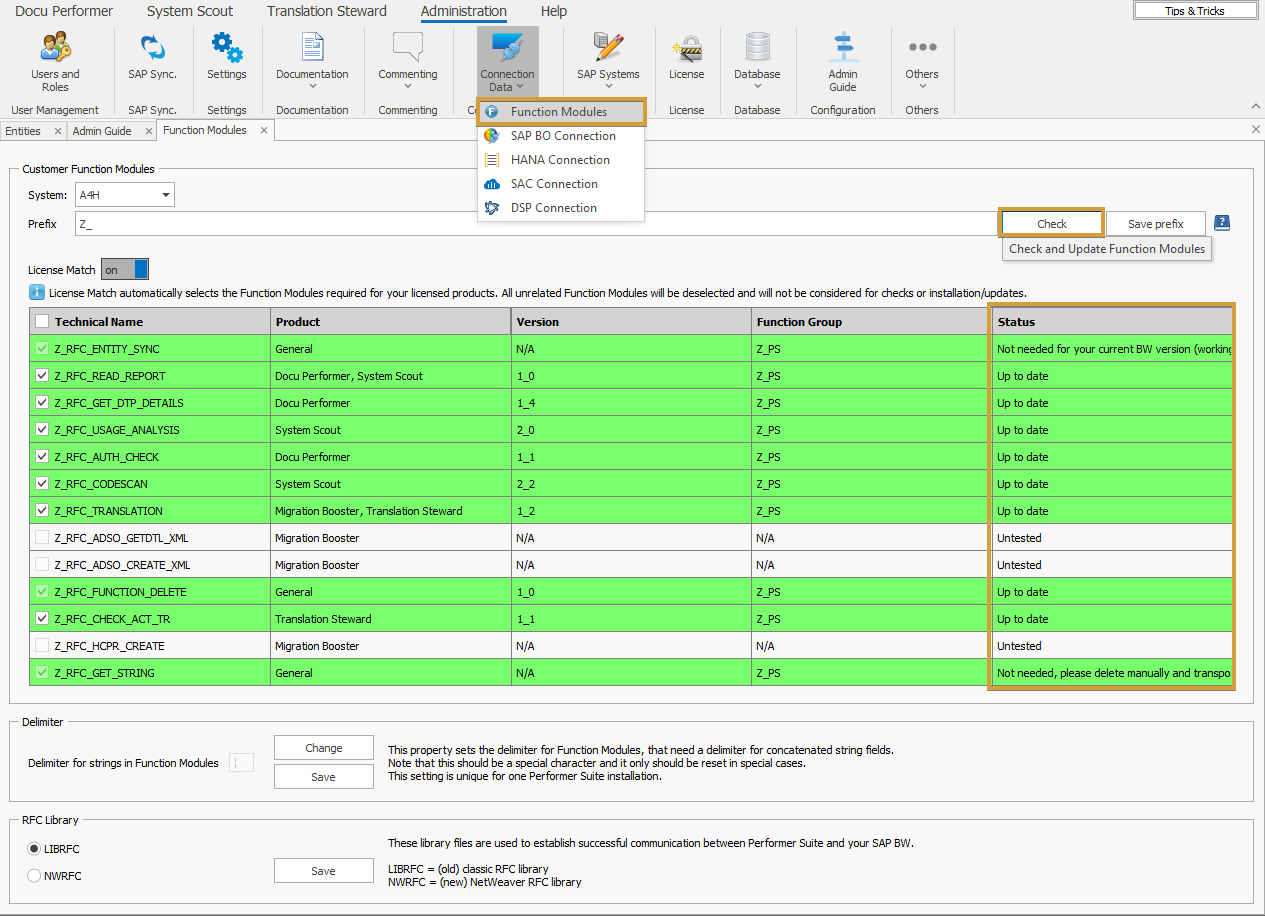
Please note that only the selected function modules will be checked for version updates.
Product-independent function building blocks of the type General are always checked.
The automated creation process is designed as follows:
-
The Performer Suite first deletes any existing Custom Function Modules with the specified prefix using the function module
RFC_FUNCTION_DELETE. -
The second step is to create the custom function modules of the new version.
As with the installation, a user with the necessary authorizations is required, and, starting from certain versions, also a developer key.