
In this chapter, you will find the authorizations required to successfully perform actions in the Performer Suite.
Download all PDFs and BW role files (ZIP, 2.7 MB): Download
Last Update: 27.02.2025
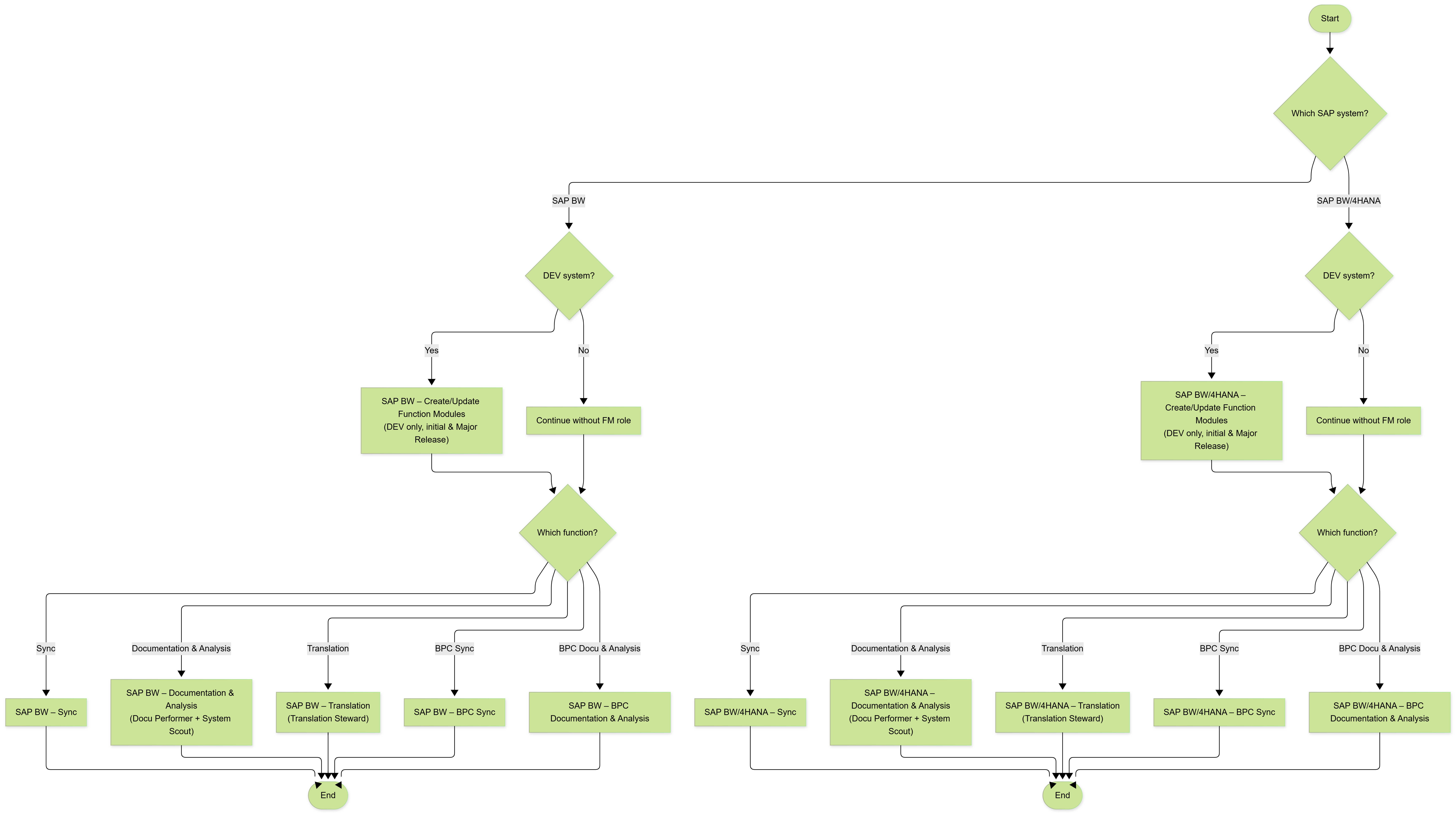
To save time, you can download the SAP roles listed below and import them into your SAP system.
How to: Upload SAP Roles to your BW + BW4HANA
SAP S/4HANA
We do not differ between S/4HANA and BW/4HANA.
Please use BW/4HANA authorizations for your S/4HANA.
|
|
Product |
Download SAP Role |
Documentation |
Description |
|---|---|---|---|---|
|
SAP BW/4HANA – Create/Update Function Modules |
General |
Only the admin-user needs to create function modules (in your development system). |
||
|
SAP BW/4HANA – Sync |
General |
ACGR-Z_ROLE_PS_SYNC_BW4001-20250106-Doc_EN-Com_EN-A4H.pdf
|
Required by users who should be able to synchronize your SAP metadata with your Performer Suite database (mandatory to see your SAP entities).
|
|
|
SAP BW/4HANA – Documentation and Analysis |
Docu Performer & System Scout |
|
ACGR-Z_ROLE_PS_DP_SYSC_BW4001-20250227-Doc_EN-Com_EN-A4H.pdf
|
Required by every user who works with the Performer Suite (in every SAP system).
|
|
SAP BW/4HANA – Translation |
Translation Steward |
Z_ROLE_TRANSLATION_STEWARD.SAP
|
ACGR-Z_ROLE_TRANSLATION_STEWARD001-20251216-Doc_EN-Com_EN-A4H.pdf
|
Add this role in addition to the standard Performer Suite user to use the Translation Steward. |
|
SAP BW/4HANA – BPC Sync |
General |
|
ACGR-Z_ROLE_PS_SYNC_BPC4001-20220308-Doc_EN-Com_EN-A4H.pdf
|
Users who should be able to synchronize their BPC SAP metadata. |
|
SAP BW/4HANA – BPC Documentation and Analysis |
Docu Performer & System Scout |
ACGR-Z_ROLE_PS_DP_SYSC_BPC4001-20220308-Doc_EN-Com_EN-A4H.pdf |
User who works with BPC entities in the Performer Suite. |
|
|
Product |
Download SAP Role |
Documentation |
Description |
|---|---|---|---|---|
|
SAP BW –
|
General |
Role for users who should be able to create and update function modules (in your development system). |
||
|
SAP BW – Sync |
General |
Role for users who should be able to synchronize the SAP metadata with your Performer Suite database. |
||
|
SAP BW – Documentation and Analysis |
Docu Performer & System Scout |
Role for users who should be working with the Performer Suite (perform Documentation and analysis functions). |
||
|
SAP BW – Translation |
Translation Steward |
|
Add this role in addition to the standard Performer Suite user to use the Translation Steward. |
|
|
SAP BW – BPC Sync |
General |
Role for users who should be able to synchronize the BPC metadata with your Performer Suite database. |
||
|
SAP BW – BPC Documentation and Analysis |
Docu Performer & System Scout |
ACGR-Z_ROLE_PS_DP_SYSC_BPC001-20220308-Doc_EN-Com_EN-BI2.pdf |
User who works with BPC entities in the Performer Suite (perform Documentation and analysis functions). |
|
|
Product |
Note |
|---|---|---|
|
ERP |
General |
Please use all authorizations from SAP BW above. Theoretically, all entities and tables that exist in BW should also exist in ERP.
|
|
|
Product |
Documentation |
Note |
|---|---|---|---|
|
SAP BO |
General |
Contains the rights required for synchronizing SAP BO entities in the Performer Suite. |
|
|
Product |
Documentation |
Note |
|---|---|---|---|
|
SAP HANA |
General |
We recommend that you connect to your HANA system via our new way:
|
|
|
Product |
Note |
|---|---|---|
|
SAC |
General |
See chapter:
In summary:
The User's role permissions in SAC are only relevant if an OAuth client of the Interactive Usage type is used, which requires a SAC user login within the Performer Suite. We have tested various Roles and have come to the following conclusion:
|
|
|
Product |
Note |
|---|---|---|
|
DSP |
General |
The Datasphere user used in the Performer Suite needs to be authorized to the desired Spaces. The user must have a Custom and Scroped Role for those Spaces that enables READ for the following aspects:
Alternatively you can assign the user the following Standard SAP Roles:
See chapter:
|
AutomationTool
When scheduling documentations via the Automation Tool, the dedicated SAP user needs the authorizations for synchronization, documentation & analysis.