
You can define bookmarks in Word templates that will be filled with values when a documentation is generated.
Those bookmarks can only be used once in the Word Template.
Available bookmarks are:
Example file: bookmarks.dotx
|
Bookmark |
Exported Value |
|
SID |
SID of the currently selected SAP system |
|
DATE_GEN |
Generation Date of the document |
|
SCENARIO |
Scenario description |
|
SC_VERSION |
Scenario Version (custom input) (Scenario Export) |
|
SETTINGS_VARIANT |
Selected Settings Variant for the degree of technical details of the documentation |
|
EXPORT_VARIANT |
Selected Comment Variant of defined entity comment chapters (Maintaining Comment Variants) |
|
USER |
Current user name (full name available, else user ID) |
|
SCENARIO_TECH_NAME |
The technical name of a Scenario |
|
GRID_COMMENT1 |
Grid Comment 1 of the documented Entity or Scenario in the current selected language (not possible for the export in a single WORD file with multiple entities) |
|
GRID_COMMENT2 |
Grid Comment 2 of the documented Entity or Scenario in the current selected language (not possible for the export in a single WORD file with multiple entities) |
|
GRID_COMMENT3 |
Grid Comment 3 of the documented Entity or Scenario in the current selected language (not possible for the export in a single WORD file with multiple entities) |
|
GRID_COMMENT4 |
Grid Comment 4 of the documented Entity or Scenario in the current selected language (not possible for the export in a single WORD file with multiple entities) |
|
GRID_COMMENT5 |
Grid Comment 5 of the documented Entity or Scenario in the current selected language (not possible for the export in a single WORD file with multiple entities) |
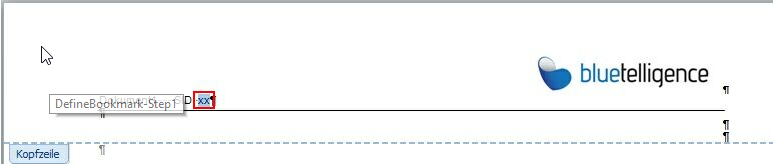
The following sample shows how the bookmark SID can be integrated into a Word Template. The SID of the current SAP system will be integrated into the header so that it will be visible on every page of the exported document.
-
Edit the header and insert text "SID: xx" (xx can be any other text of your choice)
-
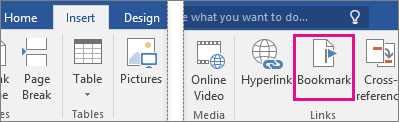
Mark the xx text and choose menu "Insert" -> "Bookmark"
-
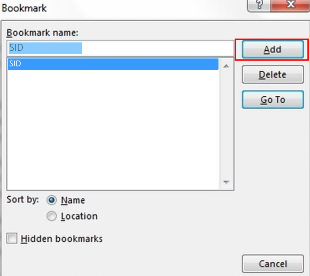
Add a bookmark named "SID"
-
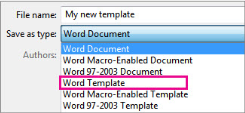
Save Word document as .dotx file
Result: When you create a document using the Word Template the bookmark will be filled with the SID:
