
Architecture
-
Performer Suite is a .NET-based application for Microsoft Windows.
-
It requires no administrative rights and makes no entries in the Windows Registry.
-
Apart from a few custom function modules—which Performer Suite can create automatically—no adaptations or installations are needed in your SAP system.
-
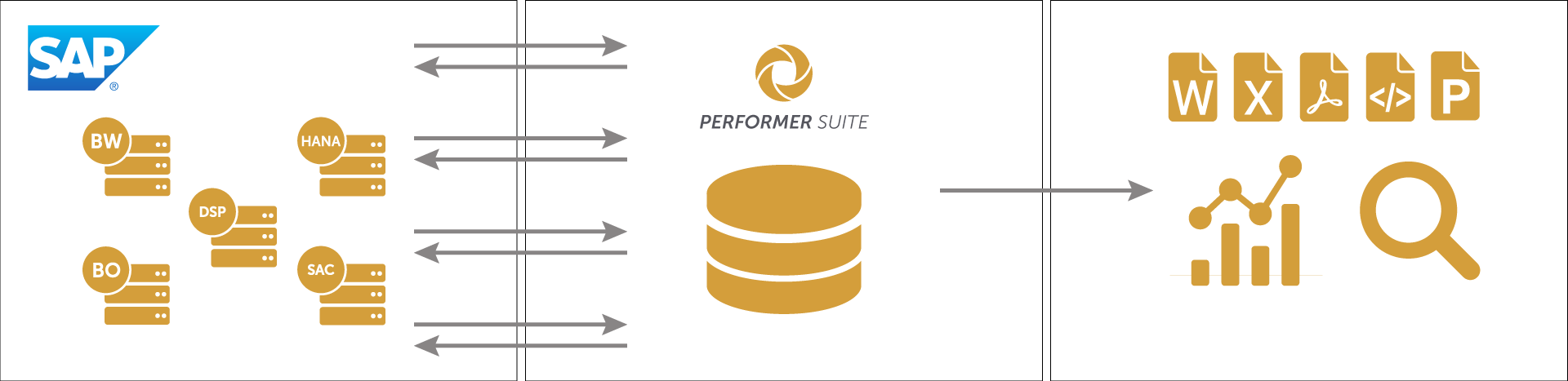
For storing synchronized objects, data, and comments, you can use an SQLite, SQL Server, or Oracle database.
-
When running an analysis or generating documentation, Performer Suite communicates with your SAP systems via remote-enabled function modules (BW, ERP) or the RESTful interface (BO, HANA, SAC, DSP).
-
Results are provided as analysis or documentation in various output formats: Word, Excel, PowerPoint, PDF, and HTML.
Technical Requirements
The following minimum system requirements and installed software are required on the client system in order to use the products of the Performer Suite:
Screen resolutions (for Clients and AutomationTool)
-
Recommended: 1980 x 1080, 1920 x 1200, and higher.
-
Still working: 1680 x 1050, 1600 x 900, 1440 x 900, 1400 x 1050
-
Severely limited (do not use): 1366 x 768, and lower.
Clients
-
Disk space: ~2 GB
-
2 GHz CPU, 8 GB RAM
-
Microsoft .NET Desktop Runtime 8.0.24 or higher
-
.NET 9, 10, 11 are not supported at present.
We are working on making it possible.
-
-
Open Office or Microsoft Office (Version must be >= 2002/2003 (with installed Compatibility Pack for Open XML formats))
-
64-bit: Windows: 11 / 10 / 7 / 8.1 / 8 Windows 11 support
-
64-bit: Windows Server: 2025 / 2022 / 2019 / 2016 / 2012 / 2012 R2
Installing the Performer Suite does not require administrator permission if installed in the path "C:\PerformerSuite"
AutomationTool
-
Disk space: ~1 GB
-
2 GHz CPU, 8 GB RAM
-
Microsoft .NET Desktop Runtime 8.0.24 or higher
-
We are working on making it possible.
-
-
64-bit: Windows: 11 / 10 / 7 / 8.1 / 8
-
64-bit: Windows Server: 2025 / 2022 / 2019 / 2016 / 2012 / 2012 R2
Database Server
-
Disk space: ~5 GB
-
vCPU and RAM: Depends strongly on your workload. Add more vCPU and RAM if you experience poor performance.
-
SQL-Server usage: >= SQL Server 2005 (9.0)
-
Oracle usage: >= Oracle 10g
-
64-bit: Windows Server: 2025 / 2022 / 2019 / 2016 / 2012 / 2012 R2 / 2008 R2
When using the commenting function of the Docu Performer, it is recommended to use an SQL Server or an Oracle as a database.